The Complete Guide to Software Localization
The digital world is borderless, but your software isn’t. Not until you localize it.
Imagine launching a groundbreaking new app, a sophisticated CRM system, or a cutting-edge piece of medical software in a foreign market, only to watch it fail. It’s not because the product is bad. It’s because the user interface (UI) uses local slang no one understands, the date format breaks every time, or the entire user experience feels rigid and foreign.
That sinking feeling is the cost of viewing localization as an afterthought or a simple language swap instead of a strategic, business-critical process.
For companies looking to scale their product adoption worldwide, software localization services are the most important investment after development. It’s the difference between merely being available in a new market and being adopted by that target audience. It is, quite literally, the key to unlocking billions in revenue and building a truly global brand.
In this comprehensive guide, we’ll strip away the jargon and walk you through what software localization truly is, why it’s critical for global businesses, and the robust, continuous process that expert localization teams use to deliver a truly native experience.
Table of Contents
What is Software Localization?
Localization, in its essence, is the process of making something truly local—beyond language, beyond translation. From a technical perspective, it’s the adaptation of content, products, or services to fit the cultural, linguistic, and functional realities of a specific market.
From a business perspective, localization is strategic. It’s how global brands earn trust in local markets. It bridges the gap between what a product offers and how users perceive it. Businesses localize to connect—to make their message, product interface, and customer experience feel intuitive to users in their own cultural context. The payoff is tangible: higher engagement, lower churn, and faster adoption in each target market.
So, what is localization in software?
In this framework, it’s the practical application of these principles within digital environments. Localization in software is the process of adapting interfaces, content, and functionalities to align with the linguistic, cultural, and technical norms of each user’s region.
Every element—text, graphics, measurements, currencies, and even UX flow—is adjusted to ensure the product performs and feels native to that market. Every variable, string, or design element becomes part of a broader translation and adaptation ecosystem.
In essence, software localization transforms a global product into a local experience. It ensures that a platform designed in one language speaks fluently in another, reflects local expectations, and operates seamlessly for users.
How is Software Localization Different from Software Translation?
This is one of the most common points of confusion in the global strategy space. While often conflated, localization and translation are distinct activities.
| Feature | Software Translation | Software Localization |
| Focus | Linguistic accuracy of the source text. | Holistic adaptation of the entire product. |
| Scope | Just the words (translatable content). | Text, UI, UX, graphics, dates, currency, legal, and cultural context. |
| Goal | To convey the original meaning. | To create a native, seamless user experience. |
| Process | Translating text files. | An engineering-heavy process integrated into the development cycle (often continuous localization). |
| Outcome | Translated text. | A fully functional, culturally tailored software product. |
Software translation is a component of localization, but localization goes deeper. A high-quality translation might call a ‘shopping cart’ a ‘trolley’ for a UK audience, but effective software localization ensures that the payment gateway is compliant with local regulations, the help files reflect local business hours, and the iconography avoids any unintentional offense based on local cultural norms.
The Indispensable Benefits of Software Localization
If you’re only targeting one country, you don’t need localization. But if you have global ambitions, the benefits of software localization directly impact your company’s financial health and reputation.
1. Market Penetration and Revenue Growth
The most obvious benefit is the increase in addressable market size.
The numbers tell a clear story: global audiences are online—but not just in English.
According to W3Techs, more than half of all websites use English as their primary content language. In fact, English accounts for 49.40% of internet content in 2024.

Yet, less than 26% of global internet users actually understand English, meaning that nearly three out of four people online cannot fully engage with most web content without translation support.
So, while English remains the most practical language for initial global reach, its footprint is far smaller than most businesses assume.
Data from the 2022 Web Globalization Report Card reinforces this shift. Over the past two decades, the average number of languages supported by leading global websites has grown from 6 in 2000 to around 30 in 2022, as companies recognize that multilingual readiness is now a core growth driver.

Studies consistently show that users are far more likely to purchase and actively use a product when it’s available in their native language. For example, a Common Sense Advisory report found that 76% of online shoppers prefer buying products with information in their native language, and 40% will not buy from websites in other languages.
In practice, this trend signals a new business standard: if your product or platform isn’t localized, it’s invisible to the majority of potential users. The most competitive digital leaders—from eCommerce to SaaS—now treat localization as infrastructure, not an afterthought. Each additional language opens new markets, improves customer trust, and compounds global reach.
2. Enhanced User Experience (UX)
A poor UX is the number one killer of app downloads and software adoption. When a user encounters a non-localized product, they are often faced with:
- Text expansion: Translated text that is longer than the original, breaking the layout of the user interface.
- Format errors: Incorrect date, time, or currency formats.
- Cultural missteps: Images, colors, or symbols that are irrelevant or even offensive.
By effectively localizing your product, you eliminate these friction points. You build trust and credibility by showing your target audience that you respect their language and culture, leading to higher adoption rates, lower churn, and positive word-of-mouth growth.
3. Competitive Advantage
In many nascent global markets, competitors might be slow to localize. Launching a high-quality, fully localized version of your product can create a massive, temporary competitive moat. It positions you as the serious, dedicated option in that region, making it incredibly difficult for rivals to catch up once you’ve established deep-seated user loyalty.
4. Reduced Support Costs and Legal Risk
When users understand your software perfectly, they submit fewer support tickets. Localization, especially of documentation and error messages, acts as a self-service support system. Furthermore, many regions have specific legal and compliance requirements that must be met (e.g., data privacy, payment methods, accessibility). Professional localization ensures that your localized versions meet these mandates, mitigating unnecessary legal risk as you expand into the global market.
The Software Localization Process: A 6-Step Deep Dive
The software localization process is cyclical, technical, and collaborative. It involves more than just linguists; it requires developers, engineers, project managers, and quality assurance specialists.
Here is a breakdown of the robust, continuous localization workflow utilized by expert localization teams.
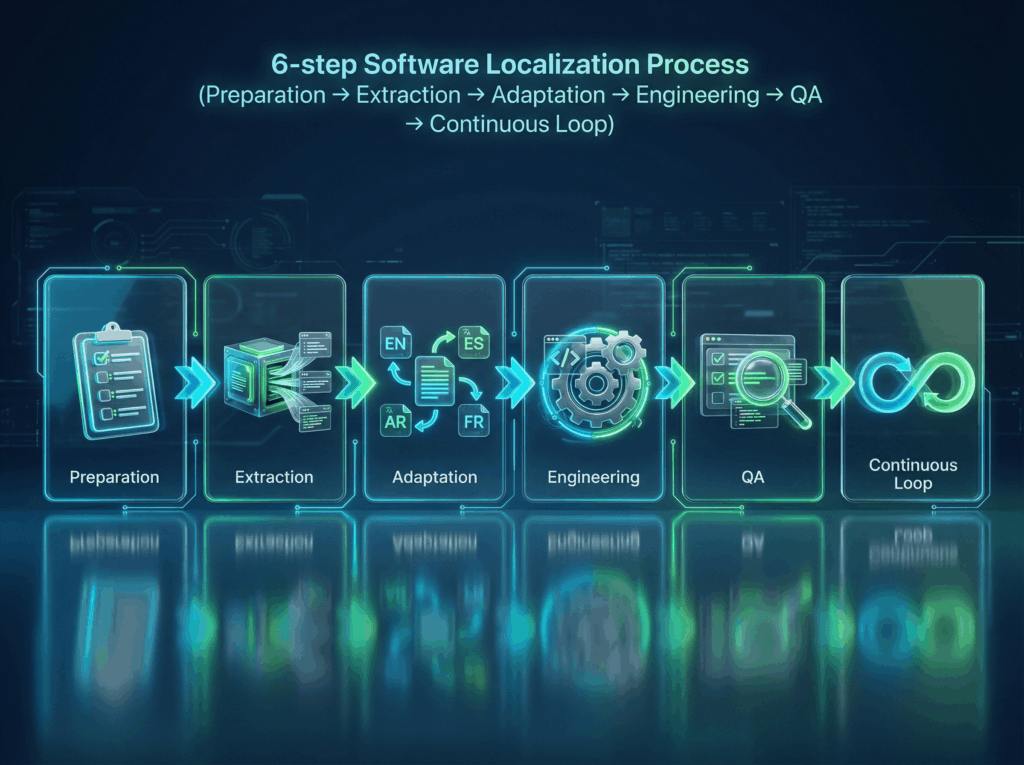
Step 1: Preparation and Assessment
Before a single word is translated, the ground must be prepared. This is where your globalization strategy is finalized.
- Scope Definition: Determine which languages/locales (e.g., Brazilian Portuguese vs. European Portuguese) and which files (UI strings, help documentation, marketing copy) will be localized.
- Internationalization Review: This is a development step where the source code is modified to make the software ready for localization. This involves isolating translatable content from the code, handling text expansion, preparing for different character sets (like Arabic or Chinese), and ensuring the code can handle locale-specific formatting. Failure to internationalize properly leads to painful, costly rework later on.
- Tool Setup: Establish the core technology stack. This includes setting up a robust Localization Management System (LMS) and ensuring that linguistic assets like translation memory (TM) and glossaries are created and populated.
Expert Insight: An experienced provider of IT Translation Services will work with your developers upfront to ensure your source code is properly internationalized. This proactive step can reduce your long-term localization costs.
Step 2: Extraction and Engineering
Once the product is ready, the content needs to be pulled out of the development environment.
- File Extraction: Localization teams work with developers to extract all translatable content strings from the source code, typically into standardized file formats like .json, .xml, .po, or resource files.
- Context Provision: Engineers must ensure that context is provided to the linguists. A single word like “Save” can mean “to save a file” (a verb) or “a discount” (a noun). Without context, the quality of the translation will suffer. Screenshots, use-case descriptions, or integration with the development environment are key.
Step 3: Linguistic and Cultural Adaptation
This is the core translation and cultural review phase.
- Translation & Adaptation: Professional linguists, native speakers residing in the target market and specializing in the relevant subject matter (e.g., medical software localization), translate the extracted strings. They do not just provide direct equivalents; they focus on adapting software to the local cultural context, idiom, and style.
- Cultural Review: The team reviews visual assets (icons, colors, images) to ensure they are appropriate and resonant with the local market. For instance, colors that symbolize mourning in one culture might represent happiness in another.
- Style and Terminology: All linguists strictly follow the client’s terminology list and style guide to ensure consistency across the entire software product and its related documentation. Leveraging translation memory here speeds up the process and drives better consistency.
Step 4: Localization Engineering and Reintegration
The translated files now go back to the engineering team.
- File Integrity Check: Localization engineers verify that the translated files maintain the correct file structure and coding conventions (e.g., no missing tags or broken placeholders) before they are ever placed back into the application.
- Build and Testing Environment: The translated files are re-inserted into the source code to create the localized version, or “build.” This is the first time the localized strings are seen in context within the actual user interface.
- Pseudo-Localization: A smart trick used by engineers is to run a pseudo-localization test before actual translation. This involves replacing strings with characters that simulate text expansion and non-ASCII characters to catch layout issues early.
Step 5: In-Context Quality Assurance (QA)
This is the non-negotiable step that separates a good localization from a great one.
- Linguistic QA (LQA): Native-speaking testers use the localized versions of the software just as an end-user would. They hunt for untranslated strings, grammar errors, awkward phrasing, and cultural mistakes in the live application.
- Functional QA: Testers check for bugs introduced by the localization process, such as broken links, truncated text (layout issues caused by text expansion), corrupted characters, and functionality errors related to locale (e.g., incorrect date input fields or broken search functionality).
- Feedback Loop: All QA findings are logged, fixed by the translation/engineering teams, and then re-tested, ensuring the entire process maintains rigorous quality standards.
Step 6: Post-Launch and Continuous Localization
The release is just the beginning. Modern software development uses agile methodologies, meaning updates and new features are constant. Your localization strategy must be agile, too.
- Continuous Integration (CI/CD): Localization should be integrated directly into your CI/CD pipeline. When a developer checks in a new feature, new strings are automatically routed to the localization management platform, translated, and automatically merged back into the build upon completion.
- In-Market Feedback: Gather feedback from your new target market users to iterate on and refine the language and experience over time.
Technical Tooling: The Engine Behind Effective Localization
The complexity and volume of modern software localization projects demand advanced technology. Relying on simple spreadsheets or email attachments is a recipe for errors, delays, and exorbitant costs.
The right tooling enables speed, quality, and scalability.
1. Translation Memory and Term Bases
A translation memory is a database that stores every previously translated segment. If a sentence or phrase has been translated once, it never needs to be translated again.
- Efficiency: TM can reduce total project costs by up to 30-50% and dramatically cut turnaround times.
- Consistency: Term Bases (glossaries of approved terms) ensure that specialized, technical, or branded terms are always translated the exact same way across every platform and document, helping to ensure consistency in the final product.
2. Machine Translation and AI
Machine translation engines, especially those customized with client-specific TM data, are now a fundamental tool for speed, particularly in high-volume, low-impact areas like internal documentation or rapidly evolving strings.
The key is Human Post-Editing (PE). Expert linguists review and refine the MT output, ensuring the final text retains the nuance, tone, and quality required for public-facing software. This combination provides the speed of AI with the quality of human expertise.
3. Localization Management Systems (LMS)
These cloud-based platforms manage the entire workflow: string extraction, context provision, translation, QA, and reintegration. They act as the central hub, providing transparency, automation, and real-time project tracking for all stakeholders—from your developers to the Torjoman localization teams.
Overcoming Common Software Localization Challenges
Even with a defined software localization process, companies run into common pitfalls. Awareness is the first step toward mitigation.
1. Dealing with Design and Development Constraints
The biggest challenge is often development related. Developers frequently hardcode text strings into the source, making them inaccessible for localization.
- Solution: Enforce strict internationalization guidelines from the start. All text—including error messages, placeholders, and tooltips—must be externalized from the code base. Engineers should also allow for variable text expansion, reserving more space in the UI to accommodate longer languages like German or Finnish.
2. Context Deprivation
Translating individual strings without knowing where they appear in the app (the screen, the button, the workflow) is a primary source of poor quality.
- Solution: Utilize modern LMS tools that integrate directly with the application, allowing linguists to see a live preview or screenshots of the text in context.
3. Localization of Non-Text Assets
It’s easy to forget about graphics, videos, and audio. A marketing video showing a credit card interface needs localization for the local payment method, and a diagram showing a person needs cultural adaptation.
- Solution: Treat all non-text assets as translatable. Create a system for replacing graphics with locale-specific versions. This ensures a truly seamless and culturally resonant user experience.
A Final Thought
Software localization is not a transactional service; it’s a strategic partnership. The success of your global product hinges on the quality, security, and expertise of your localization teams.
At Torjoman, we safeguard your product’s reputation and global potential. We integrate deep technical IT Translation Services with native-speaking cultural expertise, creating localized versions of your product that don’t just work well but also feel native.
Ready to take your application to the next billion users?
Contact Torjoman today for a software localization strategy assessment.
FAQ
- What is software localization?
Software localization (L10n) is the comprehensive process of adapting a software product to the linguistic, cultural, and technical requirements of a specific target market. This adaptation includes translating the translatable content, adjusting the user interface design for text expansion, integrating local currencies and date formats, and ensuring all imagery and symbols respect local cultural norms. The goal is to create a seamless, native user experience in every market.
- How is software localization different from software translation?
Software localization is a holistic, engineering-heavy process that encompasses much more than language. While software translation focuses only on the linguistic accuracy of the translated text, localization addresses the entire product. It includes adapting UI layout, changing payment methods, modifying legal disclaimers, and ensuring the product functions correctly in the new locale. Translation is just one necessary component of the larger localization process.
- Why is software localization important for global businesses?
Software localization is critical for global market success because it directly impacts adoption and revenue. It allows businesses to access over 75% of the global internet population who prefer content in their native language. Localization significantly enhances the user experience, builds trust and credibility in the local market, drives higher conversion rates, and reduces post-launch support costs by making the product intuitive and easy to use for the target audience.
- What types of software need localization?
Virtually any software product with a global user base or aspirations needs localization. This includes:
- Web Applications (SaaS): CRMs, ERPs, HR tools, collaboration suites.
- Mobile Apps: Consumer, business, and gaming applications.
- E-commerce Platforms: Checkout flows, product descriptions, and backend tools.
- Embedded Software: Consumer electronics interfaces, automotive dashboards.
- Specialized Software: Medical software localization, financial trading platforms, and industrial control systems.